|
|
|
 |
 |
 |
 |
 |
 |
| |
Timers Let's now see how a timer works. What is a timer? Its exactly what the word says... it is an instruction that waits a set amount of time before doing something. Sounds simple doesn't it. When we look at the different kinds of timers available the fun begins. As always, different types of timers are available with different manufacturers. Here are most of them:
Let's now see how to use them. We typically need to know 2 things:
When the instructions before the timer symbol are true the timer starts "ticking". When the time elapses the timer will automatically close its contacts. When the program is running on the plc the program typically displays the elapsed or "accumulated" time for us so we can see the current value. Typically timers can tick from 0 to 9999 or 0 to 65535 times. Why the weird numbers? Again its because most PLCs have 16-bit timers. We'll get into what this means in a later chapter but for now suffice it to say that 0-9999 is 16-bit BCD (binary coded decimal) and that 0 to 65535 is 16-bit binary. Each tick of the clock is equal to x-seconds. Typically each manufacturer offers several different ticks. Most manufacturers offer 10 and 100 ms increments (ticks of the clock). An "ms" is a milli-second or 1/1000th of a second. Several manufacturers also offer 1ms as well as 1 second increments. These different increment timers work the same as above but sometimes they have different names to show their timebase. Some are TMH (high speed timer), TMS (super high speed timer) or TMRAF (accumulating fast timer) Shown below is a typical timer instruction symbol we will encounter (depending on which manufacturer we choose) and how to use it. Remember that while they may look different they are all used basically the same way. If we can setup one we can setup any of them.
This timer is the on-delay type and is named Txxx. When the enable input is on the timer starts to tick. When it ticks yyyyy (the preset value) times, it will turn on its contacts that we will use later in the program. Remember that the duration of a tick (increment) varies with the vendor and the timebase used. (i.e. a tick might be 1ms or 1 second or...) Below
is the symbol shown on a ladder diagram: In this diagram we wait for input 0001 to turn on. When it does, timer T000 (a 100ms increment timer) starts ticking. It will tick 100 times. Each tick (increment) is 100ms so the timer will be a 10000ms (i.e. 10 second) timer. 100ticks X 100ms = 10,000ms. When 10 seconds have elapsed, the T000 contacts close and 500 turns on. When input 0001 turns off(false) the timer T000 will reset back to 0 causing its contacts to turn off(become false) thereby making output 500 turn back off. Click
here An
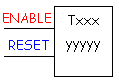
accumulating timer would look similar to this: This timer is named Txxx. When the enable input is on the timer starts to tick. When it ticks yyyyy (the preset value) times, it will turn on its contacts that we will use later in the program. Remember that the duration of a tick (increment) varies with the vendor and the timebase used. (i.e. a tick might be 1ms or 1 second or...) If however, the enable input turns off before the timer has completed, the current value will be retained. When the input turns back on, the timer will continue from where it left off. The only way to force the timer back to its preset value to start again is to turn on the reset input. The
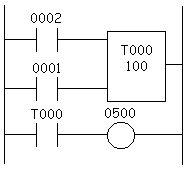
symbol is shown in the ladder diagram below. In this diagram we wait for input 0002 to turn on. When it does timer T000 (a 10ms increment timer) starts ticking. It will tick 100 times. Each tick (increment) is 10ms so the timer will be a 1000ms (i.e. 1 second) timer. 100ticks X 10ms = 1,000ms. When 1 second has elapsed, the T000 contacts close and 500 turns on. If input 0002 turns back off the current elapsed time will be retained. When 0002 turns back on the timer will continue where it left off. When input 0001 turns on (true) the timer T000 will reset back to 0 causing its contacts to turn off (become false) thereby making output 500 turn back off. Click
here One important thing to note is that counters and timers can't have the same name (in most PLCs). This is because they typically use the same registers. Always remember that although the symbols may look different they all operate the same way. Typically the major differences are in the duration of the ticks increments. |
|
|
|
|
|
|
copyright © 1996, 1997,
1998, 1999 by Phil Melore.
No part of this site may be reproduced by any means
without the express written consent of Phil
Melore.