|
|
|
 |
 |
 |
 |
 |
 |
| |
Shift Registers In
many applications it is necessary to store the status of an event that
has previously happened. As we've seen in past chapters this is a simple
process. But what do we do if we must store many previous events and act
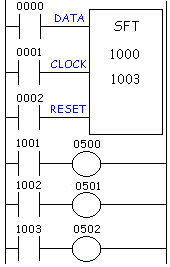
upon them later. We use a register or group of registers to form a train of bits (cars) to store the previous on/off status. Each new change in status gets stored in the first bit and the remaining bits get shifted down the train. Huh? Read on. The shift register goes by many names. SFT (ShiFT), BSL (Bit Shift Left), SFR (Shift Forward Register) are some of the common names. These registers shift the bits to the left. BSR (Bit Shift Right) and SFRN (Shift Forward Register Not) are some examples of instructions that shift bits to the right. We should note that not all manufacturers have shift registers that shift data to the right but most all do have left shifting registers. A typical shift register instruction has a symbol like that shown above. Notice that the symbol needs 3 inputs and has some data inside the symbol. The reasons for each input are as follows:
The 1000 inside the shift register symbol is the location of the first bit of our shift register. If we think of the shift register as a train (a choo-choo train that is) then this bit is the locomotive. The 1003 inside the symbol above is the last bit of our shift register. It is the caboose. Therefore, we can say that 1001 and 1002 are cars in between the locomotive and the caboose. They are intermediate bits. So, this shift register has 4 bits.(i.e. 1000,1001,1002,1003)
Lets examine an application to see why/how we can use the shift register. Imagine an ice-cream cone machine. We have 4 steps. First we verify the cone is not broken. Next we put ice cream inside the cone.(turn on output 500) Next we add peanuts.(turn on output 501) And finally we add sprinkles.(turn on output 502) If the cone is broken we obviously don't want to add ice cream and the other items. Therefore we have to track the bad cone down our process line so that we can tell the machine not to add each item. We use a sensor to look at the bottom of the cone. (input 0000) If its on then the cone is perfect and if its off then the cone is broken. An encoder tracks the cone going down the conveyor. (input 0001) A push button on the machine will clear the register. (input 0002) Here's
what the ladder would look like: Let's now follow the shift register as the operation takes place. Here's what the 1000 series register (the register we're shifting) looks like initially:
A good cone comes in front of the sensor (input 0000). The sensor (data input) turns on. 1000 will not turn on until the rising edge of the encoder (input 0001). Finally the encoder now generates a pulse and the status of the data input (cone sensor input 0000) is transferred to bit 1000. The register now looks like:
As the conveying system moves on, another cone comes in front of the sensor. This time it's a broken cone and the sensor remains off. Now the encoder generates another pulse. The old status of bit 1000 is transferred to bit 1001. The old status of 1001 shifts to 1002. The old status of 1002 shifts to 1003. And the new status of the data input (cone sensor) is transferred to bit 1000. The register now looks like:
Since the register shows that 1001 is now on, the ladder says that output 0500 will turn on and ice cream is put in the cone. As the conveying system continues to move on, another cone comes in front of the sensor. This time it's a good cone and the sensor turns on. Now the encoder generates another pulse. The old status of bit 1000 is transferred to bit 1001. The old status of 1001 shifts to 1002. The old status of 1002 shifts to 1003. And the new status of the data input (cone sensor) is transferred to bit 1000. The register now looks like:
Since the register shows that 1002 is now on the ladder says that output 0501 will turn on and peanuts are put on the cone. Since 1001 now holds the status of a broken cone, 500 remains off in the ladder above and no ice-cream is inserted into this cone. As the conveying system continues to move on, another cone comes in front of the sensor. This time it's also a good cone and the sensor turns on. Now the encoder generates another pulse. The old status of bit 1000 is transferred to bit 1001. The old status of 1001 shifts to 1002. The old status of 1002 shifts to 1003. And the new status of the data input (cone sensor) is transferred to bit 1000. The register now looks like:
Since the register shows that 1003 is now on the ladder says that output 0502 will turn on and sprinkles are put on the cone. (Its done, yummy...)Since 1002 now holds the status of a broken cone, 501 remains off in the ladder above and no peanuts are put onto this cone. Since the register shows that 1001 is now on the ladder says that output 0500 will turn on and ice cream is put in that cone. As the conveying system continues to move on, another cone comes in front of the sensor. This time it's another broken cone and the sensor turns off. Now the encoder generates another pulse. The old status of bit 1000 is transferred to bit 1001. The old status of 1001 shifts to 1002. The old status of 1002 shifts to 1003. And the new status of the data input (cone sensor) is transferred to bit 1000. The register now looks like:
Notice that the status of our first cone has disappeared. In reality its sitting in location 1004 but it's useless for us to draw an application with 16 processes here. Suffice it to say that after the bit is shifted all the way to the left it disappears and is never seen again. In other words, it has been shifted out of the register and is erased from memory. Although it's not drawn, the operation above would continue on with each bit shifting on the rising edge of the encoder signal. Click
here The shift register is most commonly used in conveyor systems, labeling or bottling applications, etc. Sometimes it's also conveniently used when the operation must be delayed in a fast moving bottling line. For example, a solenoid can't immediately kick out a bad can of beer when the sensor says its bad. By the time the solenoid would react the can would have already passed by. So typically the solenoid is located further down the conveyor line and a shift register tracks the can to be kicked out later when it's more convenient. A shift register is often very difficult to understand. When in doubt, re-read the above and you'll understand it soon enough. |
||||||||||||||||||||||||||||||||||||||||||||||||||||||||||||||||||||||||||||||||||||||||||||||||||||||||||||||||||||||||||||||||||||||||||||||||||||||||||||||||||||||||||||||||||||||||||||||||||||||||||||||||||||||||||||||||||||||||||||||||||||||||||||||||||||||||||||||||||||||||||||||||
|
|
|
|
|
|
copyright © 1996, 1997,
1998, 1999 by Phil Melore.
No part of this site may be reproduced by any means
without the express written consent of Phil
Melore.